
Chào các bạn!
Đây là bài cuối cùng trong series 12 bài về Microsoft Security và đây là bài mình muốn viết nhất từ đầu.
11 bài trước mình đã hướng dẫn từng tính năng riêng lẻ. Nhưng có một câu hỏi thực tế hơn: “Khi có incident thật lúc 2 giờ sáng, analyst cần làm gì? Theo thứ tự nào? Ai làm bước nào?”
Đó là câu hỏi mà một SOC playbook trả lời.
Bài này mình sẽ:
- Tổng hợp kiến trúc toàn bộ những gì đã xây trong 11 bài
- Xây 4 runbooks cho 4 loại incident phổ biến nhất
- Tạo daily checklist để SOC vận hành hiệu quả
- Định nghĩa KPIs để đo lường và cải thiện
Kiến trúc tổng thể toàn bộ những gì đã xây
┌─────────────────────────────────────────────────────────────────────┐
│                     MICROSOFT SECURITY STACK                         │
├─────────────────────────────────────────────────────────────────────┤
│                                                                       │
│  IDENTITY LAYER (Bài 1-3)          ENDPOINT LAYER (Bài 4)           │
│  ┌─────────────────────────┐       ┌──────────────────────────┐     │
│  │ Entra ID                │       │ Defender for Endpoint    │     │
│  │ ├── MFA (All users)     │       │ ├── Windows + macOS      │     │
│  │ ├── Conditional Access  │◄─────►│ ├── ASR Rules            │     │
│  │ │   (6 policies)        │       │ ├── Vulnerability Mgmt   │     │
│  │ └── PIM (JIT Admin)     │       │ └── Compliance Signal    │     │
│  └─────────────────────────┘       └──────────────────────────┘     │
│                │                               │                      │
│                ▼                               ▼                      │
│  ┌─────────────────────────────────────────────────────────────┐    │
│  │              DETECTION & RESPONSE LAYER (Bài 5-8)           │    │
│  │  ┌───────────────────┐    ┌──────────────────────────────┐  │    │
│  │  │  Defender XDR     │    │  Microsoft Sentinel          │  │    │
│  │  │  ├── Incidents    │◄──►│  ├── Analytics Rules         │  │    │
│  │  │  ├── Investigation│    │  ├── UEBA                     │  │    │
│  │  │  └── Response     │    │  ├── Automation Rules        │  │    │
│  │  └───────────────────┘    │  └── Playbooks (Logic Apps)  │  │    │
│  │                           └──────────────────────────────┘  │    │
│  └─────────────────────────────────────────────────────────────┘    │
│                │                               │                      │
│                ▼                               ▼                      │
│  ┌───────────────────────┐   ┌────────────────────────────────┐     │
│  │ Defender for Cloud    │   │ Microsoft Purview              │     │
│  │ (Bài 9)               │   │ (Bài 10)                       │     │
│  │ ├── CSPM/Secure Score │   │ ├── Sensitivity Labels         │     │
│  │ ├── Vulnerability Mgmt│   │ ├── DLP Policies               │     │
│  │ ├── JIT VM Access     │   │ ├── Insider Risk Mgmt          │     │
│  │ └── Attack Path       │   │ └── Audit Log                  │     │
│  └───────────────────────┘   └────────────────────────────────┘     │
│                                                                       │
│  ┌─────────────────────────────────────────────────────────────┐    │
│  │           AI ACCELERATION LAYER (Bài 11)                    │    │
│  │           Copilot for Security                              │    │
│  │           ├── Incident summary   ├── Script analysis        │    │
│  │           ├── KQL generation     └── Promptbooks            │    │
│  └─────────────────────────────────────────────────────────────┘    │
└─────────────────────────────────────────────────────────────────────┘
SOC roles ai làm gì
Trước khi vào runbooks, cần rõ vai trò. Ngay cả team nhỏ (2-3 người) cũng cần phân công rõ ràng:
| Role | Trách nhiệm | Tool chính |
|---|---|---|
| SOC Analyst L1 | Triage alert, chạy runbook, escalate khi cần | Defender XDR, Copilot for Security |
| SOC Analyst L2 | Điều tra sâu, threat hunting, viết analytics rules | Sentinel, Advanced Hunting, KQL |
| SOC Lead / L3 | Incident commander khi có critical, review playbooks, tuning rules | Tất cả tools |
| Security Engineer | Build và maintain stack, update policies, Sentinel rules | Sentinel, Intune, Entra ID |
| CISO / Manager | Review KPIs, approve major changes, communicate với business | Workbooks, reports |
Với team nhỏ hơn 3 người: một người có thể kiêm nhiều roles, nhưng cần có quy trình escalation rõ ràng, ai gọi ai khi có Critical incident lúc nửa đêm.
Daily SOC checklist buổi sáng bắt đầu làm việc
Thời gian ước tính: 30-45 phút mỗi sáng
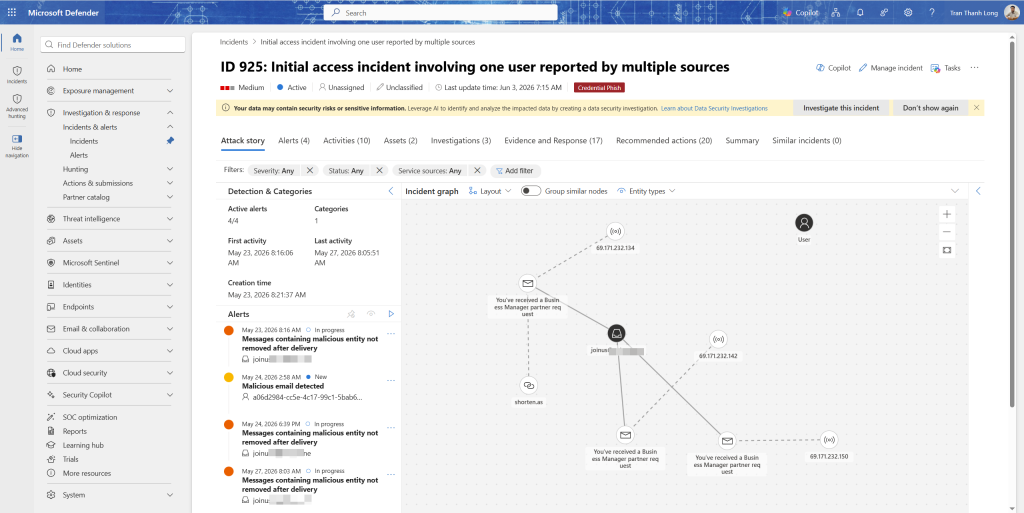
1. Incident queue review (10 phút)
- Vào Defender XDR → Incidents & alerts → Incidents
- Filter: Status = Active, Severity = High + Critical
- Với mỗi incident:
- Chưa có owner → Assign cho analyst phụ trách
- Đã có owner → check status, có cần support không
- Review incidents từ đêm qua, incident tạo lúc 22h-6h mà chưa ai xem
2. Sentinel overview (5 phút)
- Microsoft Sentinel → Overview
- Xem widgets:
- Events trong 24h có spike bất thường không
- Anomalous login activity số lượng có tăng đột biến không
- Top threats threat nào đang active nhiều nhất
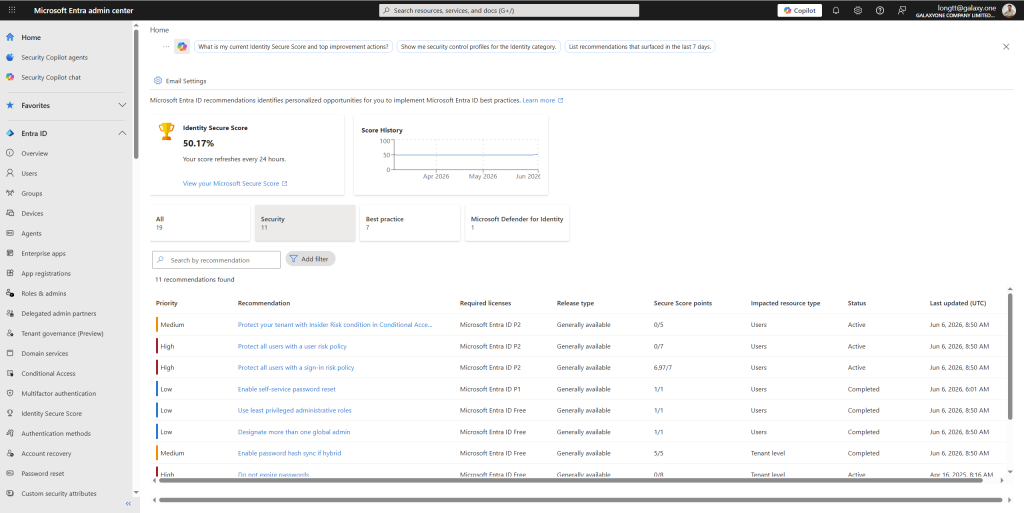
3. Identity Secure Score check (2 phút)
- Entra admin center → Identity Secure Score
- Nếu điểm giảm so với ngày hôm qua → có misconfiguration mới hoặc policy bị tắt
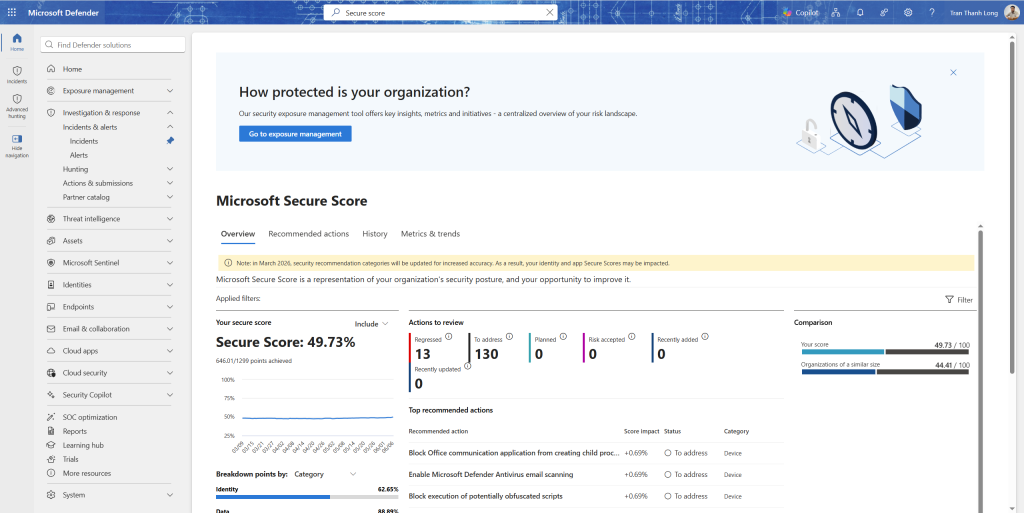
4. Defender Secure Score (2 phút)
- Defender portal → Secure score
- Xem tab Improvement actions có action nào mới không
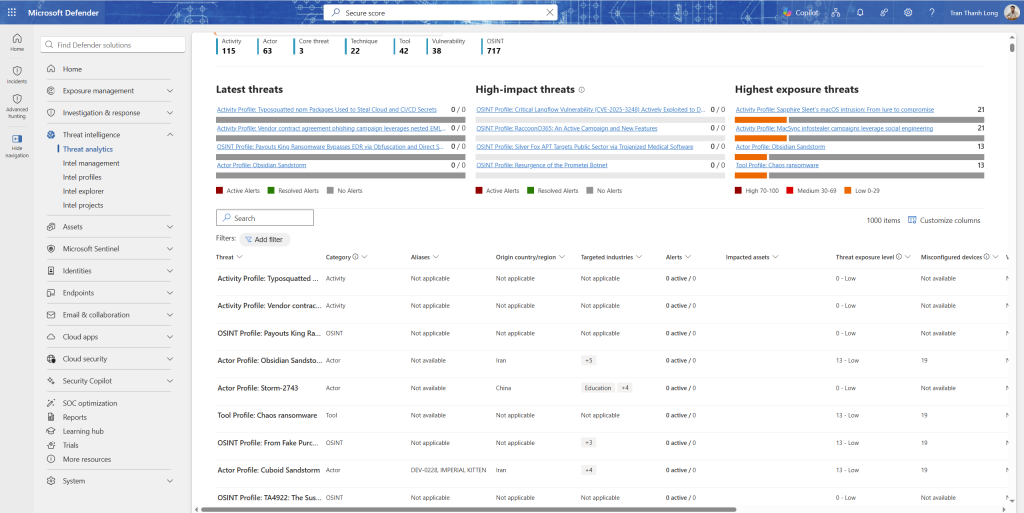
5. Threat analytics (5 phút)
- Defender portal → Threat intelligence → Threat analytics
- Filter New + Updated trong 24h
- Nếu có threat mới, xem Impacted assets tenant của mình có bị ảnh hưởng không
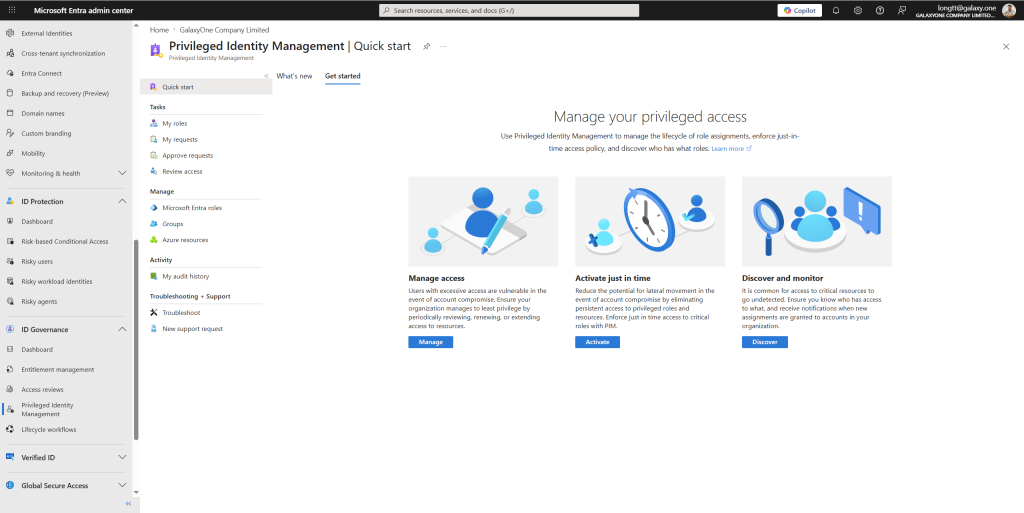
6. PIM activations review (2 phút)
- Entra admin center → PIM → Resource audit
- Xem activations trong đêm qua có activation nào bất thường (ngoài giờ, role không thường dùng) không
7. Copilot morning briefing (5 phút)
Prompt trong Copilot for Security:
Give me a security briefing for today. Summarize:
1. Any unresolved high/critical incidents from the last 24 hours
2. New threat intelligence relevant to our environment
3. Top 3 security recommendations I should act on today
Weekly SOC tasks
| Task | Người thực hiện | Tool | Thời gian |
|---|---|---|---|
| Review và tune analytics rules có nhiều false positive | L2 | Sentinel | 2 giờ |
| Threat hunting session | L2 | Advanced Hunting | 2-3 giờ |
| Review PIM access reviews | Security Engineer | Entra PIM | 30 phút |
| Check vulnerability assessment patch planning | Security Engineer | Defender for Cloud | 1 giờ |
| Review IRM alerts | L2 / Compliance | IRM | 1 giờ |
| Update SOC KPIs dashboard | SOC Lead | Workbooks | 30 phút |
| Post-incident review (nếu có incident tuần trước) | Cả team | — | 1-2 giờ |
Runbook 1: Compromised account
Trigger: Alert “User confirmed compromised” từ Entra ID Protection, hoặc Sentinel analytics rule phát hiện credential theft
Severity: High (mặc định) → có thể nâng Critical nếu là admin account
Thời gian target: Contain trong 30 phút kể từ khi phát hiện
Automated response (SOAR từ bài 8 đã làm)
Ngay khi incident được tạo, automation đã:
- Revoke tất cả sessions của user
- Disable account tạm thời
- Gửi notification Teams cho SOC team
- Enrich incident với sign-in history và MDE risk level
Manual investigation (L1 15 phút)
Bước 1: Xác nhận compromise thật hay false positive
Copilot prompt: "Review the evidence for user [username]. Is this a
confirmed compromise or possible false positive? What specific
indicators suggest compromise?"
Nếu false positive → re-enable account, close incident với classification “False positive”, ghi note lý do.
Bước 2: Xác định thời điểm và vector tấn công
- Entra ID → Sign-in logs → filter theo user
- Tìm sign-in đầu tiên từ location/IP bất thường
- Kiểm tra xem trước đó user có click link phishing không (EmailPostDeliveryEvents)
EmailPostDeliveryEvents
| where AccountUpn == "[user@domain.com]"
| where ActionType == "UrlClicked"
| where Timestamp > ago(7d)
| project Timestamp, Url, NetworkMessageId
Bước 3: Kiểm tra thiệt hại
- Emails đã bị forward ra ngoài không?
CloudAppEvents
| where AccountUpn == "[user@domain.com]"
| where ActionType in ("New-InboxRule", "Set-InboxRule")
| where RawEventData has_any ("ForwardTo", "RedirectTo")
| project Timestamp, RawEventData
- Files đã bị download không bình thường?
CloudAppEvents
| where AccountUpn == "[user@domain.com]"
| where ActionType == "FileDownloaded"
| where Timestamp > ago(7d)
| summarize Count = count(), Files = make_set(ObjectName, 20) by bin(Timestamp, 1h)
| where Count > 20
- Có thêm accounts nào bị tạo hoặc quyền bị thay đổi không?
AuditLogs
| where InitiatedBy has "[user@domain.com]"
| where OperationName in ("Add user", "Add member to role",
                           "Reset user password", "Update user")
| where TimeGenerated > ago(7d)
Containment (L1)
- Xóa tất cả inbox rules bất thường trong Exchange
- Revoke OAuth app permissions nếu có app lạ được grant
- Thêm user vào Named location exclusion block nếu attacker đang dùng VPN để bypass
Eradication (L2)
- Xác định password đã bị lộ qua channel nào (phishing, credential stuffing, insider)
- Nếu qua phishing: quarantine tất cả emails cùng sender/subject/URL
- Reset password của user → MFA re-enrollment
- Review tất cả OAuth permissions của user → revoke apps không cần thiết
- Kiểm tra thiết bị user có bị compromise không → MDE scan
Recovery
- Re-enable account sau khi password reset và MFA setup
- Notify user qua kênh phụ (phone) về việc tài khoản bị compromise
- Monitor sign-in của user trong 7 ngày tiếp theo với alert threshold thấp hơn
Post-incident
- Document timeline đầy đủ
- Nếu qua phishing: update DLP rule hoặc Safe Links policy nếu cần
- Nếu qua password reuse: communicate với user về password hygiene
Runbook 2: Malware / ransomware trên endpoint
Trigger: MDE alert malware detected, hoặc Sentinel custom rule phát hiện suspicious process chain
Severity: High → Critical nếu là server hoặc file server
Thời gian target: Isolate device trong 10 phút kể từ khi phát hiện
Automated response
- Teams notification với device details và risk score
- Enrich với CVE vulnerability list của device
- MDE antivirus scan tự động trigger (nếu cấu hình AIR)
Manual investigation (L1 10 phút)
Bước 1: Đánh giá mức độ nguy hiểm
Copilot prompt: "Analyze the malware incident on device [devicename].
What type of malware is this? Has it spread to other devices?
What is the risk of data exfiltration? Should I isolate immediately?"
Bước 2: Kiểm tra lateral movement
DeviceNetworkEvents
| where DeviceName == "[infected-device]"
| where Timestamp > ago(24h)
| where RemotePort in (445, 3389, 22, 135, 139)
| where RemoteIPType == "Private"
| summarize count() by RemoteIP, RemotePort
| sort by count_ desc
Nếu thấy connections đến nhiều IP private khác → có thể đang lateral move.
Bước 3: Kiểm tra persistence
DeviceRegistryEvents
| where DeviceName == "[infected-device]"
| where Timestamp > ago(24h)
| where RegistryKey has_any (
    "\\Run\\", "\\RunOnce\\", "\\Services\\",
    "\\ScheduledTasks\\", "\\Winlogon\\"
)
| project Timestamp, RegistryKey, RegistryValueName, RegistryValueData
Containment
- Isolate device ngay:
- Defender XDR → Device → Actions → Isolate device
- Hoặc trong incident: Respond → Isolate device
- Block file hash trên toàn tenant:
- Defender XDR → Action center → Indicators → + Add indicator
- Hash của malware file → Block
- Nếu nghi ransomware → ngay lập tức notify backup team để:
- Snapshot VM nếu là Azure VM
- Kiểm tra backup integrity trước khi ransomware có thể encrypt backup
Eradication (L2)
- Live response vào device để collect forensics package:
- Device → Actions → Initiate Live Response
getfile [malware file path]run [forensics script]
- Full disk scan từ MDE
- Kiểm tra scheduled tasks, services, startup entries
- Remove persistence mechanisms
- Patch CVE nếu malware vào qua vulnerability
Recovery
- Unisolate device sau khi clean
- Verify clean qua full scan report
- Monitor device trong 24h sau recovery
- Nếu không clean được hoàn toàn → rebuild từ golden image
Runbook 3: Phishing campaign
Trigger: Nhiều users nhận cùng một email phishing, một hoặc nhiều user đã click
Severity: Medium → High nếu users đã click và submit credentials
Thời gian target: Quarantine tất cả emails liên quan trong 15 phút
Automated response
- Teams notification
- Email summary từ Defender for Office 365
Manual investigation (L1)
Bước 1: Xác định scope của campaign
EmailEvents
| where Timestamp > ago(24h)
| where SenderFromAddress == "[phishing sender]"
    or Subject contains "[phishing subject keyword]"
    or UrlDomain has "[phishing domain]"
| summarize RecipientCount = dcount(RecipientEmailAddress),
            DeliveredCount = countif(DeliveryAction == "Delivered"),
            BlockedCount = countif(DeliveryAction != "Delivered")
    by SenderFromAddress, Subject
Bước 2: Tìm users đã click
EmailPostDeliveryEvents
| where Timestamp > ago(24h)
| where ActionType == "UrlClicked"
| join kind=inner (
    EmailEvents
    | where SenderFromAddress == "[phishing sender]"
    | project NetworkMessageId, RecipientEmailAddress
) on NetworkMessageId
| project Timestamp, RecipientEmailAddress, Url
Bước 3: Kiểm tra users đã click có sign-in bất thường sau đó không
let ClickedUsers =
    EmailPostDeliveryEvents
    | where ActionType == "UrlClicked"
    | where Url has "[phishing domain]"
    | project AccountUpn, ClickTime = Timestamp;
IdentityLogonEvents
| where Timestamp > ago(24h)
| join kind=inner ClickedUsers on AccountUpn
| where Timestamp > ClickTime
| where RiskLevelDuringSignIn != "none"
    or CountryCode !in ("VN")
| project AccountUpn, ClickTime, LoginTime = Timestamp,
          CountryCode, IPAddress, RiskLevelDuringSignIn
Containment
- Soft delete tất cả emails liên quan:
- Defender for Office 365 → Explorer → search theo sender/subject
- Select all → Actions → Soft delete
- Block sender domain trong tenant:
- Security portal → Policies & rules → Threat policies → Tenant Allow/Block Lists
- Add sender domain → Block
- Với mỗi user đã click → khởi động Runbook 1 (Compromised Account) cho user đó
Eradication và Recovery
- Submit phishing URL lên Microsoft: Microsoft Intelligence
- Nếu domain impersonate Microsoft/brand khác → report abuse lên registrar
- Tạo custom detection rule để catch emails tương tự trong tương lai
Runbook 4: Insider threat / data exfiltration
Trigger: IRM alert risk score cao, hoặc DLP alert mass download + upload ra ngoài
Severity: Medium → High
Thời gian target: Investigation trong vòng 24h (không cần isolate ngay vì cần thu thập evidence)
Lưu ý pháp lý quan trọng: Insider threat investigations cần có sự tham gia của HR và Legal từ đầu. Không tự ý đọc emails cá nhân hay files không liên quan đến scope điều tra. Mọi bước cần được document.
Investigation (L2 + Legal/HR)
Bước 1: Xác nhận bằng chứng ban đầu
- IRM → click vào alert → xem activity breakdown
- Xem Investigation priority score và các activities đóng góp vào score
- Xem Content explorer loại files nào user đã access
Bước 2: Timeline 90 ngày của user
let TargetUser = "[user@domain.com]";
union
(CloudAppEvents | where AccountUpn == TargetUser),
(OfficeActivity | where UserId == TargetUser),
(IdentityLogonEvents | where AccountUpn == TargetUser)
| where TimeGenerated > ago(90d)
| project TimeGenerated, ActionType, Application,
          ObjectName, IPAddress, CountryCode
| sort by TimeGenerated desc
Bước 3: Kiểm tra exfiltration channels
// Check uploads to personal cloud storage
CloudAppEvents
| where AccountUpn == "[user@domain.com]"
| where ActionType == "Upload"
| where Application !in ("Microsoft SharePoint Online", "Microsoft OneDrive")
| where Timestamp > ago(30d)
| summarize UploadCount = count(),
            TotalSizeMB = sum(todouble(RawEventData.FileSize)) / 1048576
    by Application, bin(Timestamp, 1d)
| sort by Timestamp desc

// Check USB copy events
DeviceEvents
| where InitiatingProcessAccountUpn == "[user@domain.com]"
| where ActionType == "RemovableMediaMount"
    or ActionType == "UsbDriveMounted"
| where Timestamp > ago(30d)
Bước 4: Quantify potential damage
CloudAppEvents
| where AccountUpn == "[user@domain.com]"
| where ActionType == "FileDownloaded"
| where Timestamp > ago(30d)
| where ObjectName has_any (".pdf", ".docx", ".xlsx", ".zip", ".pptx")
| summarize FileCount = count(),
            FileList = make_set(ObjectName, 50)
    by bin(Timestamp, 1d)
| sort by Timestamp desc
Containment (sau khi có đủ evidence và approval từ HR/Legal)
Không disable account ngay, điều đó sẽ alert user biết bị điều tra. Thay vào đó:
- Increase monitoring: giảm threshold IRM policy cho user này
- Preserve evidence: export audit logs, emails, file access logs trước khi bất cứ thứ gì bị xóa
- eDiscovery hold: đặt litigation hold trên mailbox của user
- Nếu trong notice period → notify HR để có kế hoạch access revocation vào ngày cuối
Post-incident
- Nếu confirmed exfiltration: đánh giá data đã ra ngoài là gì, impact với business
- Báo cáo cho DPO nếu có personal data bị leak (GDPR/PDPD Vietnam requirement)
- Review và tighten DLP policies để ngăn tương lai
KPIs đo lường hiệu quả SOC
Không có KPIs thì không biết SOC đang tốt hay xấu, không có basis để cải thiện.
KPIs vận hành
| KPI | Định nghĩa | Target tốt | Cách đo |
|---|---|---|---|
| MTTD (Mean Time to Detect) | Thời gian từ khi compromise đến khi có alert | < 24h | Từ incident timeline |
| MTTR (Mean Time to Respond) | Thời gian từ khi alert đến khi có response action | < 1h (High), < 4h (Medium) | Từ incident log |
| MTTC (Mean Time to Contain) | Thời gian từ khi phát hiện đến khi isolate | < 30 phút (Critical) | Từ incident log |
| False Positive Rate | % alerts không phải threat thật | < 20% | Incidents closed as FP / total incidents |
| Automation Rate | % incidents có ít nhất 1 automated action | > 60% | Incidents with SOAR action / total |
| Alert Coverage | % alert types có runbook | > 80% | Alert types with runbook / total types |
KPIs bảo mật
| KPI | Định nghĩa | Target |
|---|---|---|
| Identity Secure Score | Điểm bảo mật Identity | > 70% |
| Devices Secure Score | Điểm bảo mật Endpoint | > 65% |
| MFA coverage | % users có MFA | 100% |
| Patch compliance | % devices không có Critical CVE | > 90% |
| DLP incidents | Số incidents data exfiltration mỗi tháng | Trending down |
| Phishing click rate | % users click link trong simulation | < 5% |
Dashboard KPIs trong Sentinel
Tạo custom workbook để track KPIs tự động:
- Sentinel → Workbooks → + New
- Thêm các queries:
MTTR query:
SecurityIncident
| where TimeGenerated > ago(30d)
| where Status == "Closed"
| extend MTTR_hours = datetime_diff(
    "hour",
    ClosedTime,
    CreatedTime
)
| summarize avg_MTTR = avg(MTTR_hours),
            p50_MTTR = percentile(MTTR_hours, 50),
            p90_MTTR = percentile(MTTR_hours, 90)
    by bin(TimeGenerated, 1w), Severity
False positive rate query:
SecurityIncident
| where TimeGenerated > ago(30d)
| where Status == "Closed"
| summarize
    Total = count(),
    FalsePositives = countif(Classification == "FalsePositive"),
    TruePositives = countif(Classification == "TruePositive")
    by bin(TimeGenerated, 1w)
| extend FP_Rate = round(100.0 * FalsePositives / Total, 1)
SOC Maturity Model bạn đang ở đâu
Sau khi làm đủ 12 bài, dùng bảng này để tự đánh giá:
| Level | Mô tả | Đã làm trong series |
|---|---|---|
| 1 — Initial | Không có monitoring tập trung, phản ứng thủ công | Baseline trước khi bắt đầu |
| 2 — Developing | MFA bật, basic Conditional Access, có Defender | Bài 1-4 |
| 3 — Defined | SIEM hoạt động, analytics rules, incident process | Bài 5-8 |
| 4 — Managed | KPIs được track, SOAR automation > 50%, runbooks có | Bài 9-12 |
| 5 — Optimizing | AI-assisted, proactive hunting, continuous improvement | Copilot + hunting + review cycle |
Sau 12 bài, bạn đang ở Level 4 trên 90% doanh nghiệp Việt Nam đang ở Level 1-2. Level 5 là hành trình ongoing, không có điểm kết thúc.
Bước tiếp theo sau khi hoàn thành series
12 bài đã phủ nền tảng. Đây là những gì nên làm tiếp để tiếp tục phát triển:
Trong 3 tháng đầu:
- Deploy đủ 12 bài lên production tenant
- Track KPIs baseline trong tháng đầu
- Chạy phishing simulation để đo click rate
- Thực hiện tabletop exercise với 2-3 scenarios
Tháng 4-6:
- Tune analytics rules dựa trên false positive data
- Mở rộng threat hunting scope 2 giờ/tuần
- Bắt đầu kết nối thêm data sources non-Microsoft vào Sentinel
- Review và update runbooks dựa trên incidents thực tế đã xử lý
6-12 tháng:
- Thi chứng chỉ: SC-200 (Security Operations Analyst), SC-100 (Cybersecurity Architect)
- Contribute back to community: chia sẻ analytics rules, hunting queries lên GitHub
- Evaluate Microsoft Sentinel MSSP option nếu team quá nhỏ để vận hành 24/7
Mình hy vọng series này mang lại giá trị thực tế cho anh em đang xây dựng hoặc vận hành SOC với Microsoft Security stack.
Nếu bạn đã đọc đến đây cảm ơn bạn rất nhiều. Hành trình xây dựng bảo mật không bao giờ kết thúc, nhưng ít nhất giờ bạn đã có bản đồ.
Hẹn gặp lại ở series tiếp theo.
Tài liệu tham khảo cuối series
- Microsoft Security documentation hub
- Microsoft Security Blog
- Microsoft Defender XDR Ninja training
- Microsoft Sentinel GitHub
- MITRE ATT&CK framework
- SC-200 study guide
Bài viết có gì chưa rõ hoặc bạn muốn thêm runbook cho một loại incident cụ thể, cứ để lại comment bên dưới nhé!
Long Tran | khongkho.com